
$ cat openvpn-no-shared-cipher-kubuntu.md
No Shared Cipher: Why My VPN Password Box Wouldn’t Go Away
A client sent me a fresh OpenVPN profile the other day. It’s the usual .ovpn file that OpenVPN Access Server hands out, and on Windows you double-click it and get on with your day. I’m on Kubuntu 24.04, so I imported it into NetworkManager, clicked connect, typed my password, and got… the password box again. And again. And again.
If you’ve ever been stuck in that loop you’ll know the feeling. You start doubting your own typing. You check Caps Lock. You retype it slowly, like you’re talking to a confused relative. None of it helps, because the password was never the problem.
Reading the logs, not the dialog
The password dialog tells you nothing. The journal tells you everything, so that’s where I went:
journalctl -b -u NetworkManager --since "10 min ago" | grep -i openvpn
It turned out to be three separate problems wearing the same disguise.
One: the network. UDP 1194 was simply timing out. The new profile included a fallback to TCP 443, and the server answered on that, so this one more or less fixed itself. Worth knowing, though: a dead UDP port looks exactly like a bad password from the outside.
Two: multi-factor. The server came back with AUTH_FAILED and the rather candid message No autopush factor available. The VPN uses Duo, and push hadn’t been set up on my account yet. While I was busy retyping, NetworkManager was busy retrying, and between us we got the account temporarily locked out for too many failed attempts.
Lesson learned: when a VPN keeps re-prompting, stop the connection before you work out why. A retry loop against an MFA-protected server is a fast way to lock yourself out. Once push was sorted, I approved the Duo notification on my phone and… got the password box again.
Three: the interesting one. This time the log line was:
AUTH: Received control message: AUTH_FAILED,Data channel cipher negotiation failed (no shared cipher)
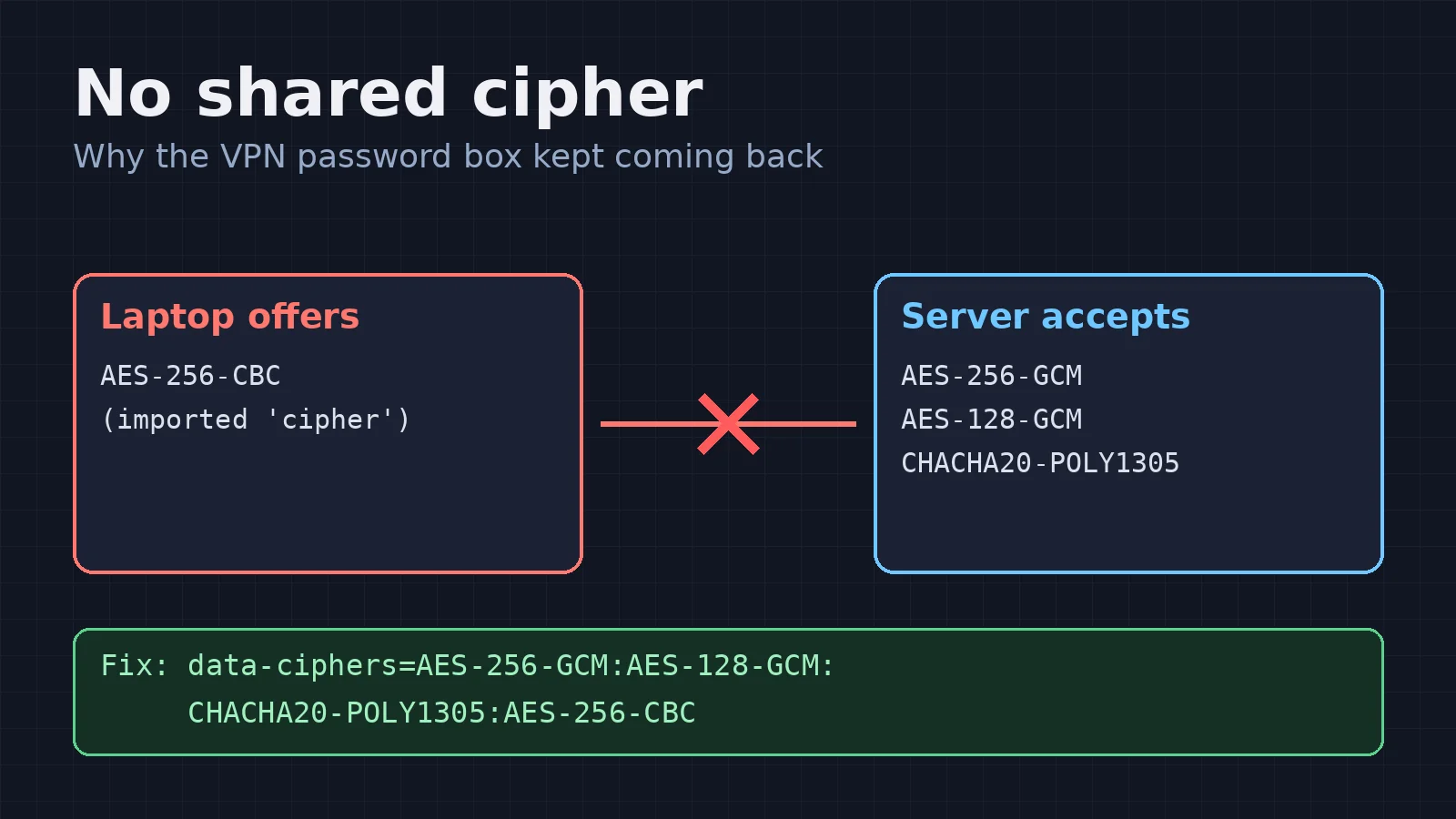
Authentication had worked. The laptop and the server just couldn’t agree on how to encrypt the tunnel.
What “no shared cipher” actually means
Before any traffic flows, the OpenVPN client and server agree on a data channel cipher. The client offers a list, and the server picks one it likes. If there’s nothing in common, the server hangs up.
The profile contained a single, old-style line:
cipher AES-256-CBC
Up to OpenVPN 2.5, the client quietly added that cipher to its list of ciphers to offer. OpenVPN 2.6 doesn’t do that any more. The modern way is a data-ciphers list, and cipher is only a fallback for really old peers.
NetworkManager’s OpenVPN plugin imports the cipher line, but it never sets data-ciphers. So my laptop ended up offering only AES-256-CBC, the server wasn’t having it, and every attempt ended in “no shared cipher”, which NetworkManager shows as… another password prompt.
To be clear, this isn’t the server’s fault, and it isn’t the client’s fault either. Windows users with OpenVPN Connect use the same profile without any trouble, because Connect offers the modern ciphers by default and treats cipher as an extra. Access Server includes the line so older clients can still connect. The gap is purely in how the Linux importer translates the file.
The fix
One command, with your connection name in place of <VPN>:
nmcli connection modify "<VPN>" +vpn.data "data-ciphers=AES-256-GCM:AES-128-GCM:CHACHA20-POLY1305:AES-256-CBC"
That puts the modern ciphers first and keeps the profile’s cipher at the end as a fallback. In other words, it’s what OpenVPN 2.5 used to do for you. I reconnected, approved the push, and the tunnel came up.
Bonus gotcha: where did the internet go?
Connected, and then nothing loaded. The server pushes redirect-gateway, so all my traffic and DNS lookups went down the tunnel, and none of it was coming back out to the wider internet. Split tunnelling fixed it, so only the client’s own network goes through the VPN:
nmcli connection modify "<VPN>" ipv4.never-default yes ipv6.never-default yes
Do check that your client’s security policy allows split tunnelling before you do this. Some organisations need all traffic to go through their network, and that’s their call to make.
There was one last surprise: the client’s LAN uses the same 192.168.1.x range as my home network. While the VPN is up, those addresses go to them, so my printer and router admin page simply vanish until I disconnect. It’s not a bug, just the price of everybody picking the same default subnet.
Is this known upstream?
Very much so. I’m not the first person to fall down this hole:
- GNOME NetworkManager-openvpn issue #97, asking for a proper data-ciphers option, has been open since June 2022.
- Issues #111 and #138 are users hitting the same CBC breakage after plugin updates, and issue #145 covers it too.
- On the Ubuntu side, LP #2084400, “Cannot add a VPN with cipher AES-256-CBC”, has been Confirmed since October 2024.
There’s good news from KDE: Plasma 6.7 adds a Data Ciphers option to the network settings, thanks to David Edmundson in January 2026. But Kubuntu 24.04 LTS ships Plasma 5.27, and in any case Plasma hands .ovpn imports to the GNOME plugin’s importer. So even with that option, a freshly imported profile like mine still breaks until someone picks the ciphers by hand.
With my Kubuntu Council hat on, that’s the bit that bothers me. Most users won’t open a journal. They’ll see a password box that won’t go away, decide the VPN is broken, and go back to Windows for that job.
So I wrote a patch
The proper fix belongs in the importer, and it’s small: about 29 lines. If a profile has cipher X and no data-ciphers, set data-ciphers to the OpenVPN 2.6 defaults with X added on the end. An explicit data-ciphers line is still imported as written. I added four new tests, updated four expectations, and all 82 import/export tests pass.
It’s deliberately different from the change that was tried and reverted in 2022 (#112). That one ran every time the connection started and replaced the list with only the legacy cipher, which broke people in the other direction. Mine runs once, at import, keeps the modern ciphers first, and leaves a normal setting you can edit afterwards.
And then I tried to contribute it
This is where my enthusiasm met the paperwork. On GNOME’s GitLab you open a merge request from a fork. When I clicked Fork, I got:
Limit reached. You cannot create projects in your personal namespace. Contact your GitLab administrator.
Fair enough: that’s anti-spam for new accounts. So I went to ask GNOME Infrastructure to lift it, and their help-desk project told me: “This project is archived. Its data is read-only.”
I understand why these protections exist. Spam is a genuine plague on open GitLab instances, and the people running them are mostly volunteers. But it’s worth being honest about the cost. Ordinary users are exactly who find bugs like this. They have the broken profile, the log lines and the motivation. Every extra hoop between “I’ve fixed it” and “here’s the fix” loses a few of them, and you never even see the fixes you lost. I’ve been doing this a long time and I nearly walked away. Someone newer to open source would have done so far sooner.
So I’ve taken the path of least resistance and attached the patch to issue #145, with the log lines, the workaround and the reasoning. A maintainer can apply it with git am, or anyone with fork rights is welcome to turn it into a merge request.
The takeaway
If you’re on Kubuntu (or any Linux desktop with NetworkManager), you import an OpenVPN profile and the password box keeps coming back:
- Stop the connection so you don’t lock yourself out.
- Check
journalctlforno shared cipher. - Run the
nmcliline above to setdata-ciphers.
The proper fix is sitting on the upstream issue for anyone who can carry it the last few yards. If that’s you, I’d be grateful, and so would a lot of people who’ll never know your name.